QuoteNovo vs QuickBooks - An Honest Comparison for Contractors
QuickBooks and QuoteNovo serve different needs. This page explains what each does well and which one fits your contracting workflow - without overpromising.
$265 one-time • 3 licenses included • Windows only
What your client receives
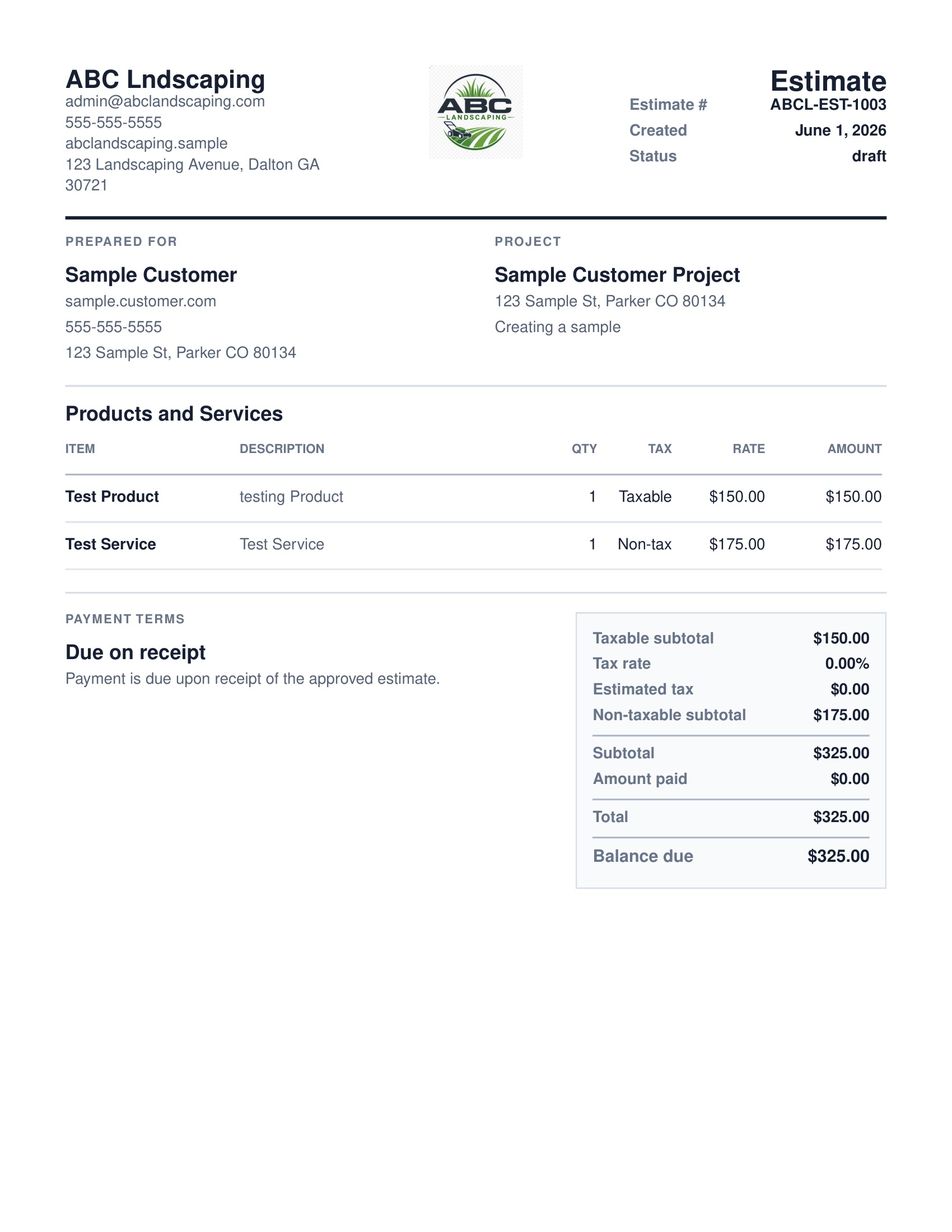
QuoteNovo helps contractors turn estimate details into a clean, customer-facing PDF proposal with line items, pricing, project information, and totals.
- Business name, logo, and contact details on every PDF
- Client name and project information
- Line-item breakdown with quantities, pricing, and tax
- Subtotals and grand total calculated in-app
- Download directly from QuoteNovo — no extra software needed
QuoteNovo vs QuickBooks: QuoteNovo does not integrate with QuickBooks. It is separate Windows desktop software — not a QuickBooks plugin, not a QuickBooks add-on, and not connected to QuickBooks in any way. QuickBooks is full accounting software with bank feeds, payroll, tax filing, and reconciliation — it is better for businesses that need those features. QuoteNovo is Windows desktop estimating and invoicing software, sold as a one-time $265 purchase (3 licenses included), without accounting features. QuoteNovo is a simpler option for contractors whose primary need is creating estimates and invoices, not running a full bookkeeping operation. The two can be used alongside each other — QuoteNovo for the estimate and invoice document workflow, QuickBooks for bookkeeping — though they do not sync or share data.
QuickBooks is full accounting software — designed for payroll, bank reconciliation, tax filing, and financial reporting. QuoteNovo covers a narrower scope: line-item contractor estimates, PDF proposals, and invoice creation, sold as a $265 one-time Windows desktop purchase. Choose QuoteNovo if your primary need is professional estimates and invoices for contracting work, you want to own your software outright with no monthly subscription, and you handle accounting separately through a CPA or spreadsheet. Choose QuickBooks if your business relies on payroll, bank feeds, bank reconciliation, expense tracking, or tax filing tools — QuoteNovo does not include any of those features and is not a full accounting replacement. The two tools can coexist: QuoteNovo for the client-facing estimate and invoice workflow, QuickBooks for the accounting side, with no integration required.
Where QuickBooks and QuoteNovo are genuinely different
- Choosing between the two tools is confusing if you are not sure which features you actually need.
- QuickBooks offers many features that small contractors rarely use - and pay for monthly.
- QuoteNovo does not replace QuickBooks for accounting - but if your main need is estimates and invoices, you may not need QuickBooks for that.
When QuoteNovo is the better fit for estimates and invoices
- For contractors who mainly need estimates and invoices - not full accounting - QuoteNovo is simpler and cheaper to own.
- One-time $265 purchase vs. monthly QuickBooks subscription.
- Focused workflow: estimate -> PDF -> invoice -> payment tracking.
What QuoteNovo includes
Every feature listed below is part of the $265 one-time purchase.
QuoteNovo vs QuickBooks
An honest look at what each tool does well. Neither product is right for every business.
| Feature | QuoteNovo | QuickBooks |
|---|---|---|
| Estimates | Yes | Yes |
| Invoices | Yes | Yes |
| PDF Proposals | Yes | Limited |
| Payment Tracking | Manual log | Yes (integrated) |
| Payroll | No | Yes (add-on) |
| Bank Feeds | No | Yes |
| Tax Filing | No | Yes (add-on) |
| Accounting Reports | No | Yes |
| Pricing Model | $265 one-time | $30-$100+/month |
| Platform | Windows desktop | Web / Cloud / Mobile / Mac |
| Data Storage | Local (your PC) | Cloud |
Example use case
A small remodeling contractor compared QuoteNovo and QuickBooks. He had no employees and sent his year-end numbers to a CPA. He used QuickBooks Online mainly to build estimates and invoice clients — paying $45 per month. He switched his estimate and invoice workflow to QuoteNovo and continued sending financials to his CPA via spreadsheet. His software cost dropped from $540 per year to $265 one-time. His CPA workflow stayed unchanged.
When QuickBooks is the right tool
QuoteNovo is not full accounting software. It does not include payroll, bank feeds, tax filing, bank reconciliation, or deep bookkeeping reports. Businesses that need those capabilities should use QuickBooks or dedicated accounting software alongside or instead of QuoteNovo.
QuoteNovo is not the right fit if you need:
- Any business that needs payroll, bank feeds, tax filing, or bank reconciliation - QuickBooks handles those; QuoteNovo does not.
- Contractors who need cloud access, mobile app, or Mac support.
- Businesses with a bookkeeper or accountant already using QuickBooks - QuoteNovo does not replace that relationship.
Stop paying monthly for software you could own
$265 one-time purchase • 3 licenses included • Windows only • No subscription
Complete a Demo and Get 10% Off QuoteNovo
Submit your info and we'll contact you to schedule a short QuoteNovo product demo. After you complete the demo, you'll receive a purchase link with 10% off your lifetime license.
- Short, focused product walkthrough
- See estimates, invoices, and PDF workflows firsthand
- Ask questions before you buy
- 10% discount link sent after the completed demo
Frequently Asked Questions
Have a question not answered here? admin@quotenovo.com